
The Twitch bot for commands, moderation and loyalty points
VidariBOT sits in your Twitch chat, answers commands, clears out spam and rewards regulars with points. It runs on our servers – your PC can be switched off.
Last reviewed:
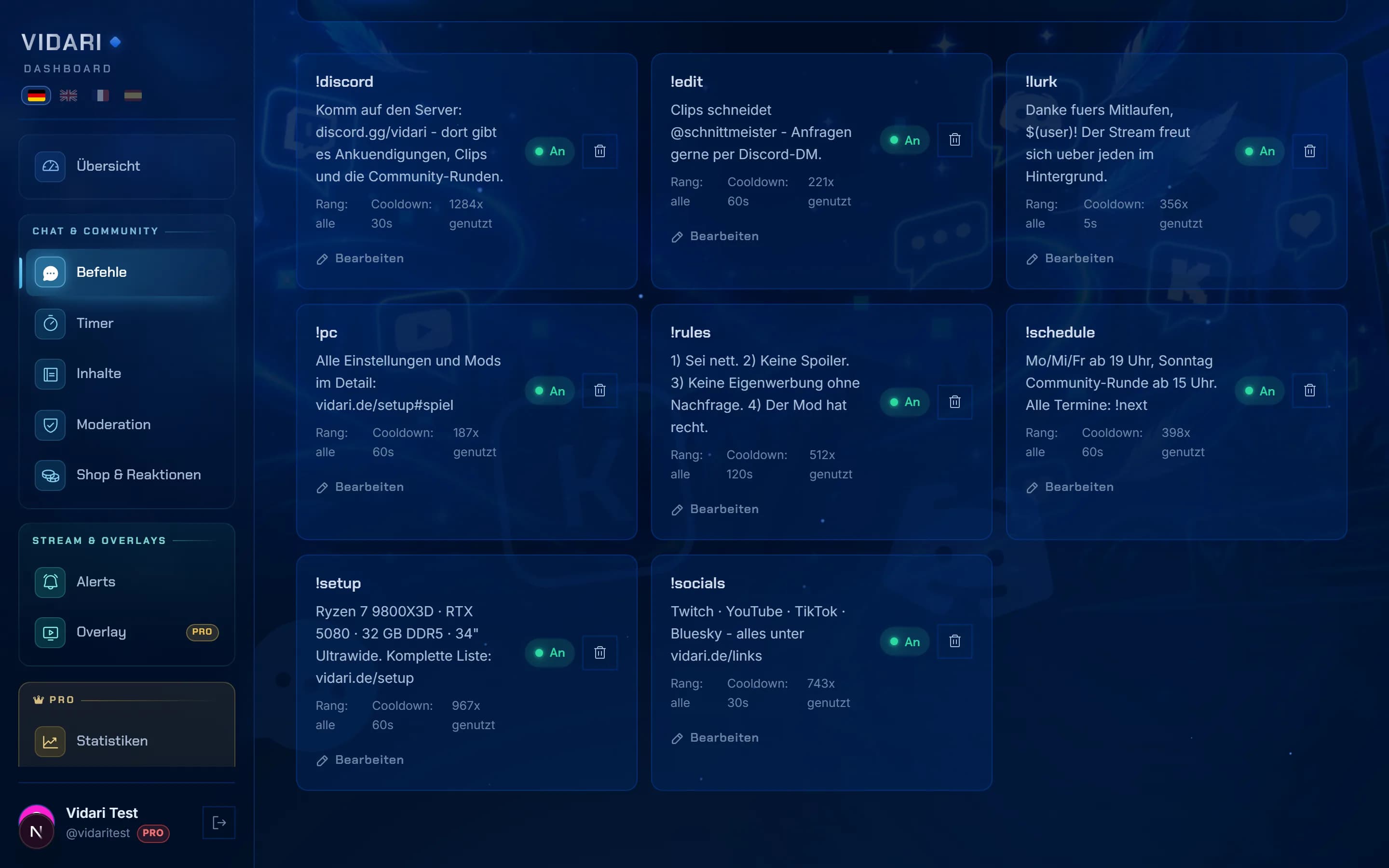
Chat commands: built-in and your own
Vidari ships 74 built-in commands in five groups: community (such as !lurk and !streak), loyalty points and shop, mini-games, info (followage, uptime, goal, quote, clip) and moderator tools (shoutout, poll, marker, title and category). You can switch every built-in command on or off and change its reply text.
You create your own commands in the dashboard or right in chat – with a reply, variables, rank, cooldown and aliases. Vidari Free allows up to 25 custom commands, Vidari Pro as many as you like.
Auto-moderation and spam protection
- Filters for insults in three tiers, viewbot ads, scams, disguised links, spam, caps, symbol floods and your own word lists – even when someone writes “1d10t” or “i.d.i.o.t”. With a warning, deletion or timeout, staggered by rank.
- Accounts that Twitch itself flags as ban evaders, or that are banned in linked channels, are removed on their first message.
- Fresh accounts posting outside links are slowed down; during a wave, Vidari switches on Twitch's shield mode automatically.
- Every action – yours, your moderators' and Vidari's – is logged with a reason in the moderation log.
Timers and announcements
Timers are recurring chat messages. They only fire once enough chat lines have come in since the last one – so the bot never talks into an empty chat. Each timer can be tied to a Twitch category or a phrase in the stream title and can alternate between two texts.
Loyalty points, shop and mini-games
Viewers earn points for their watch time. With !points they check their balance, and in the shop they redeem points for rewards you define – every redemption lands in a to-do list in the dashboard.
- Mini-games: heist, slots, duels, roulette, trivia and giveaways via !join.
- Ranks and seasons with their own colour and greeting, automatic VIP for the most loyal viewers (Vidari Pro).
- Loyalty streaks: viewers who attend several streams in a row get points and a shout-out (Vidari Pro).
Set up your Twitch bot in three steps
Sign in with Twitch
Choose “Start for free” on vidari.de and sign in with your Twitch account. There is no separate Vidari password.
Grant the rights for your channel
Twitch asks what VidariBOT may do in your channel – such as writing messages, moderating and starting polls. The bot then joins your chat.
Configure in the dashboard
Built-in commands, moderation and loyalty points work immediately. The starter pack can create five commands, two announcements, four shop items and the six standard alerts in one go.
A chat bot, not a viewer bot
Searching for “Twitch bot” also turns up services that fake viewers or followers. Vidari is not one of them: VidariBOT is a chat and moderation bot. It does not create viewers, followers or subscriptions – that breaks Twitch's rules.
What the Twitch bot costs
| Tier | Price | Included for the chat bot |
|---|---|---|
| Free | €0 | 74 built-in commands, 25 custom commands, timers, auto-moderation, loyalty points, mini-games, alert overlay |
| Pro | €0.00 per channel per month | Your own bot name, unlimited commands and timers, ranks and seasons, channel analytics, Discord bridge, all Pro overlays |
| Ultimate | €0.00 per channel per month | Everything in Pro, plus Vidari Cloud, multistream and VidariBOT in Kick chat |
Frequently asked questions
Is Vidari's Twitch bot free?
Yes. Vidari Free costs nothing and has no time limit: all 74 built-in commands, up to 25 custom commands, timers, auto-moderation, loyalty points, mini-games and an alert overlay. Vidari Pro costs €0.00 and Vidari Ultimate €0.00, each per channel per month.
Can the bot write under my own name?
Yes, with Vidari Pro. You link your own Twitch account, for example “MyChannelBot”, and Vidari then writes under that name instead of as VidariBOT.
Does my PC need to be on for the bot to work?
No. VidariBOT runs around the clock on Vidari's servers. Timers, moderation and loyalty points work as soon as you are live – whether you stream with OBS, Vidari Studio or a console.
Which rights does VidariBOT need?
Vidari requests the Twitch rights its features need, such as writing messages, moderating and starting polls and predictions. If a right is missing, the dashboard settings show which feature is affected and let you grant it with one click.
Keep reading
Bring VidariBOT into your chat
Sign in, connect your channel, done – in a few minutes and without a download.
Start for free